Built for South African fuel retailers

Run the forecourt, the shop and the back office from one screen

V50Pro replaces the paper clock book, the shift envelope, the debtors file and the month-end spreadsheet with one connected system. Staff clock in with facial recognition and geolocation, the shift closes with proof, and the numbers land in the ledger the same day — not three weeks later.

MIBCO Sector 5 SARS · VAT POPIA NRCS · OHS Biometric clocking
Drop a forecourt canopy photo here — wide shot, pumps under the canopy, ideally at dusk with lights on
1 System, not six
EOD Shift closed with proof
VAT Schedules from invoices
Built for sites across every major SA fuel network
TotalEnergies Engen Sasol Astron Energy Shell BP Viva Puma Energy
In plain terms

What the system actually does for your site

A fuel site records the same facts over and over: who worked, how much fuel moved, what the shop sold, who bought on account, what the suppliers invoiced. V50Pro captures each fact once, at the moment it happens, and carries it through to payroll, to debtors, to VAT and to the general ledger. Nothing is typed a second time, and nothing goes missing between the pump and the books.

Built around automation, not re-typing

Most of what the system records is captured automatically or read off a device at the moment it happens — a pump meter, a fingerprint scan, a photographed invoice — rather than typed in later from memory or a scrap of paper. Wherever a number can be picked up at its source, V50Pro picks it up there instead of asking someone to re-key it. That matters because manual entry is where errors creep in: a transposed figure, a missed line, a slip filed and never captured.

Because capture is automated, back office staff spend most of their time verifying what the system has already recorded rather than typing it in from scratch. Checking a captured figure against its source is a faster, more reliable task than re-entering it, so this shift from data entry to verification is itself what improves the accuracy of the reporting that reaches the owner and the accountant.

01

For the owner

You see fuel variance, cash position, account exposure and labour cost while the month is still running. Losses show up as a number attached to a shift and a person, not as a shortfall discovered at month-end. Decisions about staffing, stock and credit get made on the day they matter.

02

For management

Site managers run the roster, approve the shift close and see stock and margin by department without chasing paperwork between the forecourt and the office. Exceptions are flagged automatically, so a manager's day is spent on the two or three things that actually need a decision.

03

For staff

Attendants and cashiers clock in with facial recognition and geolocation, work a roster they can see in advance, and close their shift by following a guided screen instead of a pile of slips. Hours are counted correctly, so payslips stop being an argument.

04

For accountants

Shift actuals, account slips and captured supplier invoices arrive as structured journals against one chart of accounts. VAT schedules build themselves from invoices already photographed at the site, so month-end is a review, not a reconstruction.

05

For other stakeholders

Auditors, oil-company account managers and lenders get consistent, dated records instead of a folder of paper — attendance, fuel variance, VAT and compliance checklists that can be produced for any period on request.

A day on the site

A 24-hour site, followed as one continuous workflow

The site trades around the clock on two shifts: days from 06:00 to 18:00, nights from around 18:00 to the 06:00 close. Eight moments in that cycle, each handing its facts to the next — the emphasis throughout is on running the site efficiently and getting the most out of every shift, litre and shelf.

Because every step posts as it happens, financial reporting runs close to real time. The dealer is current with the site from the first clock-in to the last, not waiting on a report at the end of the week.

{{ active.kicker }}

{{ active.title }}

{{ active.text }}

{{ active.hands }}
Forecourt attendant smiling at the pump, in branded uniform
Real-time reporting and analysis
Cashier at the POS terminal in the shop, mid-transaction
At the POS — every sale accounted for
Handshake across a desk, or two people reviewing figures in an office
In the office — numbers that agree
The platform

Fourteen modules, one set of records

Every module is included in every plan. What changes between plans is how many people use it.

A phone or kiosk screen doing facial recognition clock-in on the forecourt
People

Facial recognition & geo clocking

Staff clock in and out with facial recognition, with location rules so attendance is tied to the site. The paper register disappears.

Owner gains:
  • hours you pay for are hours actually worked
  • ghost employees and buddy-punching are eliminated
  • geo-fencing confirms staff were on site, not just logged in
  • attendance disputes come with a timestamped record
  • labour cost updates in real time as shifts start and end
A weekly staff roster or shift schedule on a screen or board
People

Automated timetabling

Rosters build themselves around forecourt patterns such as five-on / two-off and weekly hour targets, then feed straight into payroll.

Owner gains:
  • overtime is planned, not discovered
  • rosters match trading patterns instead of guesswork
  • understaffed and overstaffed shifts are visible before they happen
  • leave and swaps are captured without a phone call to the office
  • payroll receives hours already checked against the roster
Pump nozzle in use, or a tank gauge dial
Forecourt

Fuel management

Pump meter readings, tank gauge levels and delivery notes come together into a live wet-stock position with variance calculated as the day goes.

Owner gains:
  • litre losses caught in hours, not weeks
  • tank levels and deliveries are visible without walking to the pumps
  • theft or metering faults show up as a pattern, not a rumour
  • supplier deliveries are checked against what was actually pumped in
  • wet-stock reports are ready for the oil company on request
Someone doing a shelf stocktake with a handheld scanner
Forecourt

Stock variance & reconciliation

Book stock against counted stock, for both fuel and shop lines. Deliveries, sales and counts are matched so a gap points at a cause.

Owner gains:
  • shrinkage becomes measurable and assignable
  • counts happen on a handheld instead of a clipboard and spreadsheet
  • variances are tied to a shift, a till or a person
  • reordering is based on real usage, not guesswork
  • high-shrinkage lines are flagged before they become a habit
Cashier counting cash and slips at end of shift
Shift

Shift reconciliation & EOD

A guided end-of-shift screen captures cash, card, fleet card and account slips, then holds them against expected takings for sign-off.

Owner gains:
  • a cash dispute has an audit trail behind it
  • shifts close in minutes instead of holding staff back after hours
  • cash, card and fleet totals are checked against expected takings automatically
  • short or over cash is attributed to the shift that caused it
  • managers sign off from their phone, on or off site
Convenience store shelves or till point
Shop

C-store operations

Shelf inventory, bakery production planning, department margins and POS-linked reporting, so the shop is managed as seriously as the pumps.

Owner gains:
  • shop margin you can actually steer
  • bakery production is planned against actual sales, cutting waste
  • slow-moving lines are visible before they tie up cash
  • department margins are compared week on week
  • POS sales reconcile against stock movement automatically
A customer signing a fuel account slip at the till
Money in

Local accounts (debtors)

Account slips captured at shift close post to the right customer, respect credit and prepaid limits, and roll up into statements and receipts.

Owner gains:
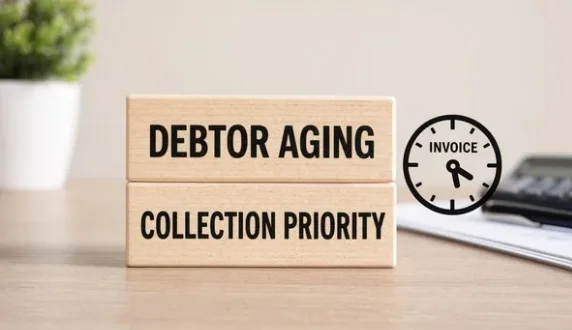
  • you know exactly who owes what, today
  • credit limits are enforced at the till, not discovered later
  • statements and receipts are generated without manual typing
  • problem accounts are visible before they become bad debt
  • collections calls are backed by an accurate, current balance
A phone photographing a supplier invoice
Money out

Invoice capture & VAT

Photograph a supplier invoice and the supplier, VAT number, amounts and department are read off it, building the purchase VAT schedule as you go.

Owner gains:
  • input VAT claimed, not lost in a drawer
  • supplier invoices are captured the day they arrive, not at month-end
  • spend by department is visible without waiting for the accountant
  • duplicate or missing invoices are flagged automatically
  • SARS-ready records are built continuously, not reconstructed
A payslip or HR paperwork on a desk
People

HR, MIBCO payroll & payslips

Sector 5–aware payroll, leave, disciplinary records and payslips generated from the same clocking and roster data the site already produced.

Owner gains:
  • payroll run without re-keying a timesheet
  • MIBCO Sector 5 rules are applied automatically, reducing compliance risk
  • leave balances and disciplinary records are always current
  • payslips are generated and distributed without manual admin
  • payroll queries are answered from one record, not several spreadsheets
A laptop showing a ledger or spreadsheet screen
Books

Accounting & general ledger

One chart of accounts, journals posted from operations, trial balance and ledger enquiry — the site's activity and the books stay the same story.

Owner gains:
  • month-end is a review, not a rebuild
  • the trial balance reflects a day that already reconciled
  • one chart of accounts is shared across every site
  • the accountant’s hours shift from data entry to advice
  • financial reports are available on demand, not just at year-end
A safety checklist clipboard on the forecourt
Compliance

OHS, food safety & POPIA

Daily safety checklists, food-safety routines under Regulation R638, fuel-handling awareness, NRCS readiness and access control minded for POPIA.

Owner gains:
  • the audit file writes itself daily
  • daily safety and food-safety checklists are completed and stored automatically
  • NRCS and OHS readiness is a report, not a scramble before inspection
  • access to personal and biometric data is controlled and logged for POPIA
  • a compliance gap is visible the day it happens, not at audit time
A staff training session or briefing
People

Training & performance

Training records and performance notes live with the person, in the same system that holds their roster, attendance and payslips.

Owner gains:
  • capability tracked, not remembered
  • training records are ready for an auditor or oil-company inspection
  • skills gaps are visible before they cause a mistake
  • performance notes travel with the person across shifts and sites
  • new hires ramp up against a documented standard, not word of mouth
An HR meeting, a signed contract, or a staff file on a desk
People

Human Resources

Contracts, staff files, disciplinary hearings, grievances, leave and terminations are managed in one record per employee, alongside the clocking, roster and payslip history the rest of the system already holds for them.

Owner gains:
  • contracts and policy documents are on file and signed, not promised
  • disciplinary process follows a documented, defensible procedure
  • CCMA and labour disputes are backed by a proper paper trail
  • leave, warnings and terminations are recorded against one employee history
  • HR admin is handled without a filing cabinet in the back office
An auditor or inspector reviewing files on site, or a compliance training session
Compliance

Business compliance & audits

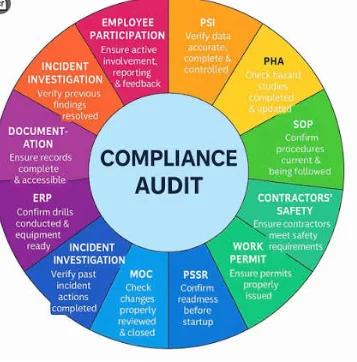
Beyond day-to-day safety checklists, the site's wider compliance calendar — licence renewals, statutory audits, oil-company standards inspections and required staff training — is scheduled, tracked and evidenced in one place, so nothing lapses unnoticed.

Owner gains:
  • licences, permits and certifications are tracked to their renewal date
  • an inspection or an oil-company audit is answered from evidence already on file
  • required training is scheduled and completion is recorded per employee
  • a lapsed requirement is flagged before it becomes a finding
  • one compliance calendar covers the site instead of several people's memories
Billing structure

One monthly fee, set by how many people use it

There is no per-module pricing and no licence to buy up front. You subscribe monthly, every module is switched on, and the only thing that changes the price is the number of active users on the system. 10 GB of document storage is included.

All amounts shown are per month and exclude VAT.

Every plan includes one tablet per site with the system preloaded, ready to use from day one. Extra tablets can be added for sites running more than one till or clocking point.

*Max and Enterprise plans include onsite support services, terms and conditions apply.

Starter
1–15 users
R5 499.70
per month, excl. VAT
  • All fourteen modules
  • Clocking, roster, payroll
  • Shift recon & fuel tools
  • 10 GB storage
Talk to us
Most sites
Growth
16–30 users
R6 974.33
per month, excl. VAT
  • Everything in Starter
  • Debtors & ledger linked
  • Typical single-site fit
  • Priority onboarding
Book a demo
Plus
31–40 users
R7 792.44
per month, excl. VAT
  • Everything in Growth
  • Larger roster capacity
  • Multi-department control
  • Guided compliance setup
Talk to us
Max
41–50 users
R9 472.88
per month, excl. VAT
  • Everything in Plus
  • High-volume capacity
  • Full module suite
  • Onsite support services*
Talk to us
Enterprise
51+ users
R209.80
per user per month, excl. VAT
  • Multi-site groups
  • Custom terms
  • Onsite support services*
  • Named support contact
Request a quote
What will I pay?
{{ calcPlanLabel }}
{{ calcAmount }}
{{ calcNote }}
Storage add-ons
10 GB — includedIn every plan
50 GBQuoted on demo
250 GBQuoted on demo
1 TBQuoted on demo

Storage covers scanned invoices, payslips and compliance records held for audit. Most single sites stay inside the included 10 GB for the first year.

From the sites

What sites are saying

Illustrative feedback based on the kind of change customers report. Send us your own words and we'll swap them in.

{{ r.stars }}

“{{ r.comment }}”

{{ r.author }}
Leave your own feedback
{{ rvNote }}
Questions

The things owners ask first

Anything not covered here, ask on WhatsApp and you will get a straight answer.

Do I have to replace my POS?+

No. V50Pro sits around the site rather than replacing the till. Sales, fuel movements and payment methods are brought in and reconciled; your existing POS and pump equipment stay where they are.

Is the price per module or per user?+

Per user band, and every module is included. A site with 22 people on the system pays the Growth fee whether it uses four modules or all fourteen. Nothing is unlocked by paying more.

Who counts as a user?+

Anyone with a record in the system — attendants and cashiers who clock and appear on payroll, as well as managers and office staff who log in. We size the band with you on the demo so you are not paying for a band you have outgrown or not yet reached.

Will my staff manage the clocking device?+

Clocking is built into the system itself: staff look at the tablet's camera and it validates them by facial recognition and geolocation, confirming both who they are and that they are on site. There is no card, code or fingerprint pad to manage, and the shift close is a guided sequence rather than a form to interpret. Training on site is part of onboarding.

What happens to my accountant?+

They get cleaner input and spend their hours on advice rather than reconstruction. Journals, VAT schedules and debtor statements come out of the system in a form they can work with directly.

How is my data protected?+

Access is role-based, so a cashier sees a shift and an owner sees the site. Personal information, including biometric records, is processed under POPIA (Act 4 of 2013), and the audit trail records who changed what.

How long does it take to get set up?+

A single site is typically live within one to two weeks: loading staff, tanks and accounts, fitting the clocking device, and training the team on shift close. Multi-site rollouts are staged site by site.

What happens if the internet goes down?+

Clocking and shift capture keep working on site and sync once connectivity returns. Trading is never held up waiting on a signal.

Can I run more than one site on the same account?+

Yes. Each site keeps its own clocking, stock and shift records, while an owner or group office sees a consolidated view across all of them. Multi-site groups are quoted together — see the calculator above.

What devices does it run on?+

V50Pro supplies the tablet your site runs on. It is preconfigured to our specifications for mobile operations before it reaches you, so there is no setup, app store or IT visit required — staff and managers simply start using it. One tablet is included per site on every plan, with the option to add more for sites running several till or clocking points.

Is training included?+

Yes, on-site training for attendants, cashiers and managers is part of onboarding, and the training module keeps a record of who has been trained on what.

What happens when a staff member leaves?+

Deactivate them and they drop off your active-user count from the next billing cycle. Their historical records stay in the system for payroll and audit history.

Is there a contract, or can I cancel?+

Subscriptions run on a fixed term of 6 to 12 months, agreed upfront. Enterprise groups can agree custom terms where that suits both sides.

Is my data backed up?+

Yes, records are backed up continuously off-site, so a lost device or a hardware failure at the site does not put your history at risk.

What if the tablet is lost, stolen or damaged?+

Let us know and we will arrange a replacement, preconfigured and ready to use. No data is lost, since clocking, shift and stock records live on the system, not on the device.

How does facial recognition and geolocation clocking actually work?+

It is built into the system, not a separate device. Staff clock in by looking at the tablet's camera; the system confirms who they are by facial recognition and confirms where they are by geolocation, so a clock-in is only accepted if the right person is genuinely on site.

What happens at the end of the contract term?+

We will be in touch before the term ends to renew on the same or an updated plan. Your historical records remain accessible regardless of the outcome.


Get in touch

See it on a site like yours

Forty minutes, your own numbers, no obligation. We walk the clock-in, the shift close, the debtors book and the payroll run in the order your day happens.

{{ formNote }}